Technical specifications:
Power voltage: 13.8 V (12 to 16V )
Current consumption: max. 1 A
Dimensions: W 175mm (6,89") x H 44 mm (1,73") x D 130 mm (5,12")
Weight: 700 g (1,54 lbs)
Operating temperature range: 0 to 55 �C (32 to 130 F)
Inputs :
|
� |
13.8 V DC input (up to 300mA without micro STACK SWITCH) |
|
� |
RS 232 input from PC |
|
� |
PTT input for hot switch protection |
Outputs :
|
� |
8 x source or sink outputs with capability of 700 mA both |
|
� |
output for LCD display - Info Panel |
|
� |
INH output: open collector max. 12V, 100mA sink
- directly connectable to Yaesu's QSK signals
|
|
� |
RS 232 for PC controling and configuring |
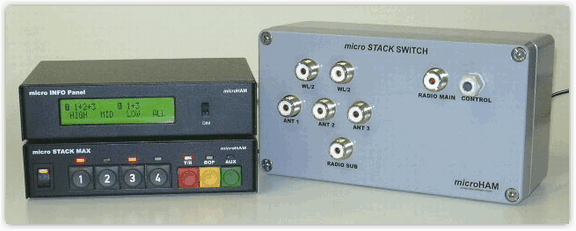
micro STACK MAX button layout
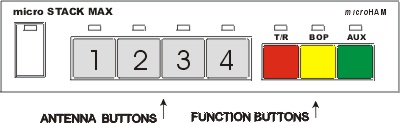
Function Buttons:
Three buttons control special functions of stack.
T/R button - Pressing this button, divide combinations of the stack to separate
combinations for receiving and for transmitting. A LED indicates when this function
is active. Change the combination of stack using the antenna buttons - change the
"receiving" combination during receiving and change the "transmitting" combination
during transmitting. As the transmitting combination can not be changed immediately
while transmitting (hot switch protection), the new configuration will become active
after releasing PTT, and after reengaging PTT you are transmitting to the newly chosen
combination. Press the T/R button once more to switch this function off. The combination
of stack both for receiving and transmitting will be now the same as the last one chosen
for receiving.
BOP button - switch the stack out of phase pressing this button. You can freely
combine functions BOP, T/R and AUX. Press the button again to change or switch off
the BOP function. The stack will switch to the last combination before switching
BOP on.
AUX button - Pressing this button one antenna will be excluded from the stack
and switched to a separate feed. If no antenna is free, a previously configured
antenna will be chosen as the default. Pressing AUX button repeatedly change the
antenna to be excluded from the stack and connected to a separate feed. Press and
hold the AUX button for a while to switch the AUX function off. The configuration
of the antennas will be restored to the combination just before the function has
been switched on.
Memory write:
Any combination of the stack (including the special functions) can be stored to
one of four memory positions. Store the combination by pressing and holding T/R
button - then choose the memory position pressing one of the buttons 1 to 4.
Select the stored combination simply by pressing one of the buttons 1 to 4 when in
memory mode.
Antenna Button Modes:
Use the antenna switches to choose the active antenna in the stack. Antenna
switches can be configured to three modes. Choose the required mode by pressing
and holding T/R button, then press BOP button for modes 1 & 2 or AUX button
for mode 3.
MODE 1 - EXCLUSIVE mode
Switch between antennas simply pressing the appropriate antenna button. All
other antennas will be disconnected. When there are two or three antennas
(the number of antennas is configurable), pressing button 4 sill select all
antennas in the stack. Any two of three antennas can be chosen together
by simultaneous pressing the appropriate antenna buttons. This mode is
recommended when using two or three antennas in the stack.
MODE 2 - TOGGLE mode
In this mode, pressing an antenna button switches the antenna on and
pressing it again switches the antenna off. There is always at
least one antenna switched on. When using two or three antennas,
pressing button 4 selects all antennas in the stack on. This
mode is recommended for three or four antennas in the stack.
MODE 3 - MEMORY mode
In this mode, pressing buttons 1 to 4 chooses previously stored combinations
of the stack (stored with the special functions). Functions of the stack
can be changed by the function buttons. Pressing any antenna button
restores the previously stored combination appropriate to the pressed button.
This mode is used for fast switching between four optimized configurations
of the stack.
Maybe this all sounds complicated, but in fact it is very simple and easy to
use and you will learn all the features within a couple of minutes.
... more detailed information about micro STACK MAX� can be found in the
manual.
Copyright � 2010 - microHAM America, LLC
webmaster: W4TV