USB Device Router:
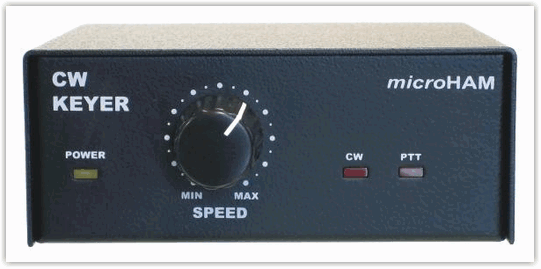
CW KEYER works in two modes - with or without a
computer connected. The functions and behavior of the keyer change based on
operating mode.
If the keyer is operating without
computer, all functions (CW transmission, WinKey settings, and CW
memories) are loaded from EEPROM memory on power up.
If a computer is connected and router running, CW Keyer
gets its configuration (behavior) from settings stored in router
software. With the router software you can store power up
behavior to the keyer as well as change setting on the fly.
The requirements of each logging or control software are
different and is sometimes difficult to find a universal setting for all the programs
one might use. For easy switching between loggers, Router has configurable presets. You
can store different keyer or port settings to these presets, rename each preset and switch
between presets in a second simply by selecting the preset button.
Router software has several tabs. The top level tab
represents the device itself. If the computer is connected to two or more keyers
or microHAM USB interfaces, each USB device will have its own top level tab. The
top level tab can be renamed to indicate which device (e.g., USB interface: TS-870)
it represents.
Below each top level device are one or more tabs - CW
KEYER has three tabs. Each of these tabs configures some function
of the device.
Ports
Here you can assign which virtual COM port carries the
requested function. You can create as many virtual COM ports as you need although
two (2) is generally enough for one CW KEYER. This screenshot displays COM4 and
COM5. (COM 1 and COM2 are physical COM ports and COM3 is occupied by an internal modem
on the test computer).
Here you assign COM ports to their functions (for example,
Radio control port to COM6, Winkey port to COM7 etc..) and store to any
presets.
CW / WinKey
Here you can configure the internal, K1EL WinKey
based, CW keyer. Thanks to Steve, K1EL for the great product. All settings
are fully documented in the WinKey manual available from:
http://k1el.tripod.com/wkinfo.html.
Mode = WinKey mode, Iambic A, Iambic B, Ultimatic and Bug Keyer
Paddle set point = level when the paddle should be closed
Swap paddles = swap paddle means reverse paddles for left handed or reverse wired paddle
Auto space = keyer generates automatic character space
CT space = keyer generates shorter automatic character space
Speed pot min/max = min/max value of the front panel speed knob (5 to 99 WPM range)
DIT / DAH = 100 / = Dit/Dah ratio from 1:2 to 1:4. Accepted number is from 200 to 400.
Weighting = weighting in percentage (from 10 to 90%)
1st extension = extension of the first dit or dah in milliseconds (QSK)
Keying compensation = extension of each dit and dah in milliseconds (QSK)
PTT lead in/tail = lead and tail delays of automatic PTT.
You can select frequency of the CW side tone generated
by internal speaker. Side tone is generated by the main CW KEYER CPU, not by pin 5
of WinKey. Pin 5 is reserved for PTT or for CW to a second radio.
The available frequencies are 1350, 675, 450, 338 Hz and none.
Speed step
defines step in WPM by pressing +/- on attached keypad.
All settings can be stored to the keyer memory as power up defaults
or may be applied immediately if the WinKey chip is not under control of a logging
program.
CW Messages
On this tab you can define CW memories
for WinKey. Up to 9 memories, each up to 50 characters long can be
stored to the keyer memory. Each memory can have delayed repeat or
can call another memory. There are some special commands which
can be applied during memory playback.
Set PTT = force PTT event as WinKey PTT event
Clear PTT = forcing release PTT event as WinKey PTT event
Merge = merge two characters together ( [M]AS will sound AS .-...)
Set WPM = force WPM to selected speed regardless of position of speed knob
Cancel WPM = cancel selected forced WPM
Set Key = close CW output for selected time in seconds
Set Wait = wait selected seconds during playback
The "Jump to" combo box provides for repeating or chaining messages.
The wait between the end of one message and the start of the next can be set in the "delay" box.
You can preview a message pressing "Test" or store it to the keyer memory by pressing
"Store." All messages can be stored at once by pressing "Store
All." All messages can be backed up and restored using
"Save to File" and "Load from File."
Messages can also be stored and replayed using F1-F9 on an external
keyboard or numbers 1-9 on a numeric keypad. Switching presets has no effect on the
saved messages.
Firmware
These settings are valid for the
current Router and firmware. As we add more features and functions, the upgrades will be for
to all CW KEYER owners. Due to the FLASH core technology of the internal microcontroller, changing firmware is as easy as installing new version of the computer software. No special hardware of software is required. Upgrades can be downloaded from
www.microHAM.com and uploaded to
CW KEYER with router software..
Copyright � microHAM America, LLC
webmaster: W4TV